RF-SMART Instructions & Insights
Are you tired of production errors from outdated, paper-based instructions? Do you struggle to communicate special work order requirements to your team? Many manufacturing companies today face these challenges daily, resulting in missed production targets and delayed shipments.

Reduce Errors & Boost Productivity with
Mobile Instruction & Insights
Transform how your team accesses and acts on critical work order information with RF‑SMART’s Instructions and Insights functionality. This enhancement delivers real-time visibility into digital documentation, special handling notes, and production targets, making them accessible to warehouse staff from workstations or handheld devices.
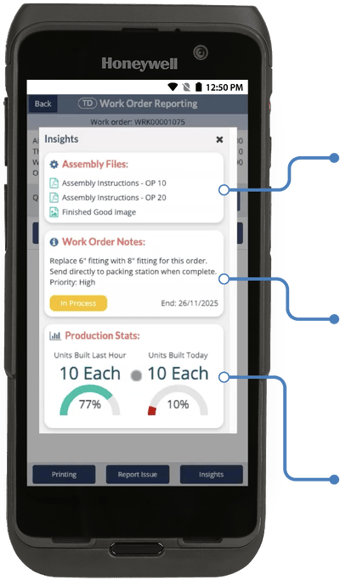
Reduce errors, eliminate paper-based processes, and keep production moving efficiency with these three powerful capabilities:
| Assembly Files: Access assembly drawings, QC documents, component lists, and travelers digitally on mobile devices at the point of work. |
| Work Order Notes: Display special handling instructions, customization details, and substitution requirements directly on the device. |
| Production Stats: Provide real-time visibility into hourly and daily production statistics to track performance against targets. |
How it Works

Setup & Access
Once licensed and configured through menu item versions, operators access Work Instructions and Insights from multiple screens within RF‑SMART building functions.

Work Order Notes
Enter job-specific notes and instructions in the work order memo field in NetSuite. These appear directly on the Work Order Notes panel, giving workers immediate visibility into special requirements, priorities, or considerations unique to each job.

Assembly Files
Attach documentation to assembly items on the item record under the Files subtab. The system automatically sources these files into the Assembly Files panel, where mobile users can select and view each file.

Production Stats
Define hourly and daily production targets for assembly items on the item record under the RF-SMART subtab. The mobile function automatically compares actual output against these goals in real-time, allowing workers to monitor progress throughout the day on the Production Stats panel.
Let’s talk about how Instructions & Insights can improve
productivity in your warehouse.