
Skip to content

RF-SMART Supply Chain Planning

Spending too much time making inventory buying decisions to avoid stockouts and overstock situations? RF-SMART turns hours of manual spreadsheet analysis into minutes of review.

Why An Inventory Optimization Solution Matters to You

Most planning and purchasing teams do not have a data problem; they have a decision problem. Buyers are often moving between NetSuite reports, saved searches, spreadsheets, and tribal knowledge - all to answer the same questions every day. RF-SMART's inventory optimization solution uses your data and configurable business rules to ensure you have the warehouse stocked with the right items, at the right time, and in the right quantities.
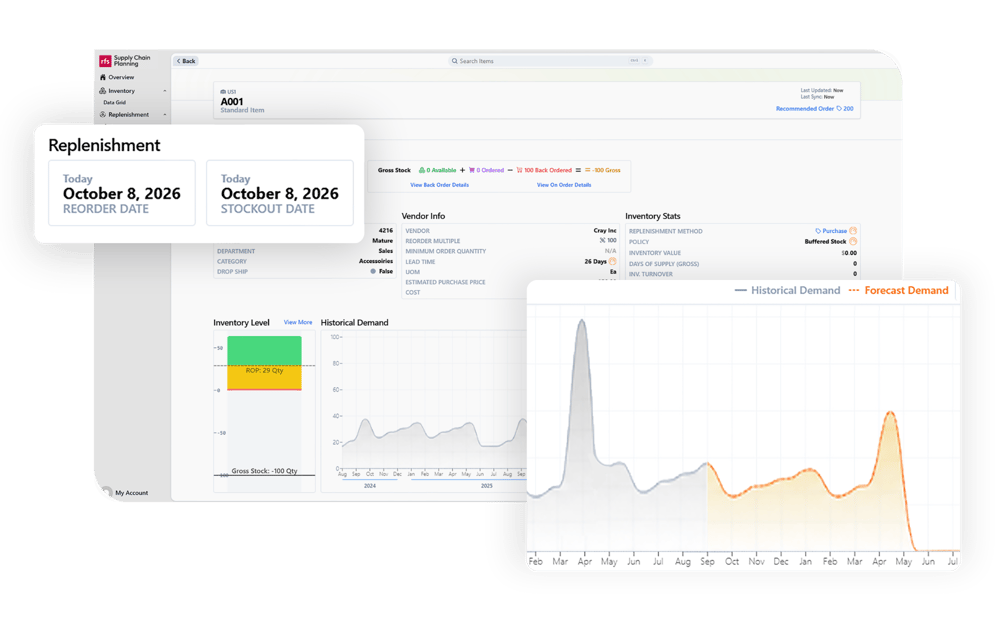
Supply Chain Planning UI

Easy by Design

Easy to Learn

An intuitive planning workflow your buyers can pick up fast, no data-science background required.


Easy to Use

Review recommendations, manage exceptions, and create Purchase Orders (PO)s and Transfer Orders (TO)s in NetSuite without ever leaving the application.


Easy to Configure

Set the business rules and build the views you want, so the solution reflects how you run your business.


Can You Relate to
These Inventory Challenges?


• Do you want to retire manual, spreadsheet-based ordering for good?
•  Are you looking for data-driven recommendations with a clear view of future demand and purchasing needs?
•  Do rising SKU counts, supplier lead times, and multiple locations make it harder to decide what to buy and when?
•  Would your business benefit from a scalable, easy-to-use way to hold optimal stock levels across your locations?

How it Works

Connect your NetSuite data.

RF-SMART's inventory optimization solution uses inventory and order data, demand and sales history, vendor lead times, stock location details, and more as planning inputs.


Set your
planning rules.

Configure business-wide and SKU-level item policies, including safety stock, reorder points, and replenishment requirements.


Generate recommendations.

The planning engine evaluates inventory needs and recommends what to purchase or transfer, how much, and when.


Review priorities
& exceptions.

Buyers review recommendations and their key drivers, then address items that need attention before approving an order or transfer.


Create orders in NetSuite.

Once approved, users create the order and post the PO or TO record to NetSuite without leaving the RF-SMART Supply Chain Planning application.


How it works 5 step process background

Want to learn more?

Supply Chain Planning Background Ch