Self-Service Kiosk
RF-SMART’s Self-Service Kiosk enables clinicians and supply chain staff to check out supplies from the central storeroom at any time, capturing every transaction in real-time with simplicity and accuracy.

Why Do Healthcare Providers Need a Self-Service Kiosk Software Solution?
Hospital storerooms are not staffed around the clock, but patient care requires 24-hour attention. When clinical staff need supplies during off-hours, those transactions are often recorded improperly or not at all. RF-SMART’s Self-Service Kiosk is designed to bridge that gap, giving your team an easy, always-available way to check out supplies while automatically generating accurate records in Oracle Cloud. The result is better inventory visibility, fewer interruptions, and a supply chain that you can count on at any hour.
How it Works
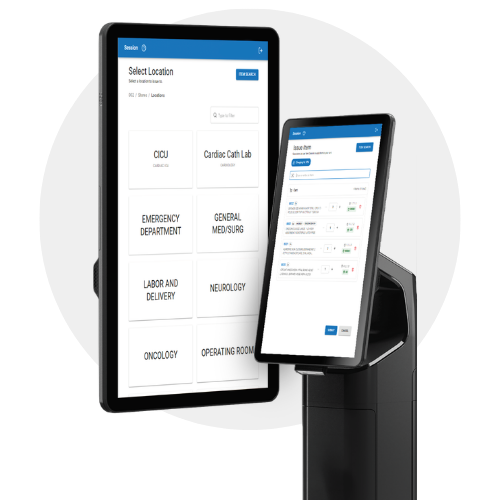
In just a few steps, your clinical staff can check out supplies at any time throughout the day:
 Select your department from the Self-Service Kiosk's on-screen menu.
|

|
 Scan items using the Bluetooth scanner for shelf tags or the kiosk's built-in barcode reader. Scan items using the Bluetooth scanner for shelf tags or the kiosk's built-in barcode reader. |

|

Review the generated list of supplies and submit the transaction. |
|
 The transaction is instantly recorded in Oracle Cloud. The transaction is instantly recorded in Oracle Cloud. |
Benefits of RF-SMART’s Self-Service Kiosk Software

Real-Time Transaction Capture Around the Clock:
Every supply checkout is recorded instantly around the clock and updated directly in Oracle Cloud, eliminating missed transactions and manual reconciliation.

Minimal Steps, No Login Required:
The Self-Service Kiosk is designed for ease of use, allowing clinicians to walk up to the kiosk and get started immediately without requiring login credentials, reducing friction and keeping clinical workflows uninterrupted.

Empowers Clinicians with Item Location Search:
The kiosk features a built-in search functionality allowing clinicians to quickly look up a specific item and identify exactly where it’s located in the showroom, significantly reducing time spent searching and improving staff confidence.
Flexible Scanning Options:
Designed to meet clinicians where they are, users have the option to either scan the shelf tag or bring the item directly to the kiosk, significantly increasing the checkout time.

Ready to Eliminate After-Hours Inventory Gaps?